
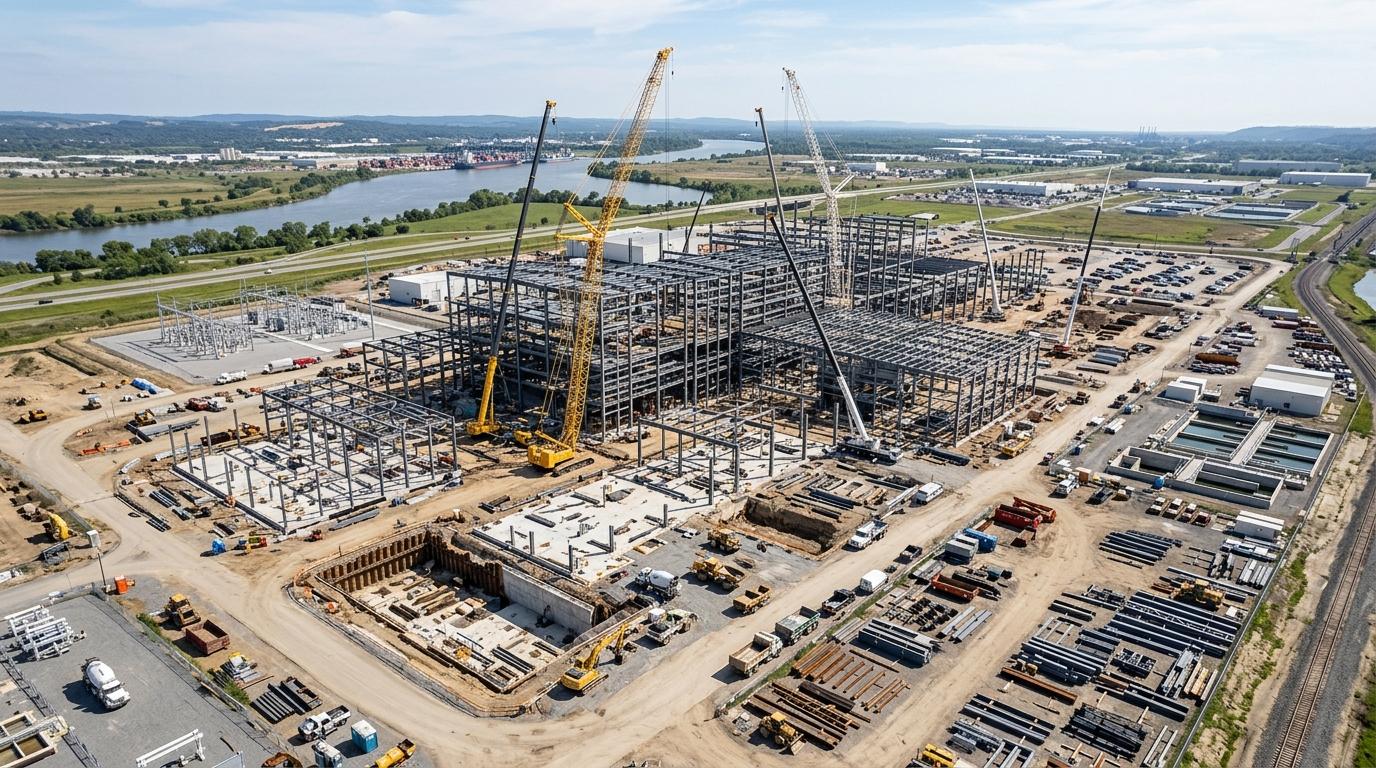
Industrial and steel engineering
Suited to steel structure, equipment installation, process piping, utilities, and other complex engineering schedules.
SIWICLOUD SC AI_PRO
Enterprise Project Controls Platform
Engineering Progress. Under Control.
From schedule planning to resource allocation and engineering quantification to project performance—make complex engineering projects measurable, analyzable, and controllable.
An intelligent schedule and resource management platform for large engineering enterprises. Centered on CPM, it unifies enterprise project structure, engineering schedules, critical path, and resource loading. AI and open agent interfaces make planning, adjustment, and analysis more efficient while engineers retain full control over schedule changes.
Enterprise Scheduling. Intelligent Resource Management.
BUILT FOR COMPLEX PROJECTS
Controlling a large engineering project is more than maintaining a Gantt chart. It means structure, process sequence, trade overlap, multi-discipline coordination, resource loading, and coordination across projects. SC AI_PRO brings that into one schedule and resource platform.
Suited to steel structure, equipment installation, process piping, utilities, and other complex engineering schedules.

Planning across disciplines, systems, and construction phases.

Manage complex construction networks, sequence ties, and discipline-specific resource loading.

Schedule collaboration for large projects, multiple sections, and many participants.
PRODUCT ARCHITECTURE
Schedule, resources, quantity measurement, and project performance are the delivered controls. AI and MCP are the way in; the software still calculates, checks, and writes the plan.
Schedule planning and control
CPM · WBS · Critical Path · Baseline
Resource management and analysis
Resource Loading · Histogram · Leveling
Weighting and progress measurement
Weighting · Progress Measurement
Project performance management
EVM · SPI · CPI · Forecasting
AI + MCP intelligent collaboration layer
AI Scheduling · Agent Integration
01 · ENTERPRISE SCHEDULING
From a single project schedule to enterprise-wide schedule control.
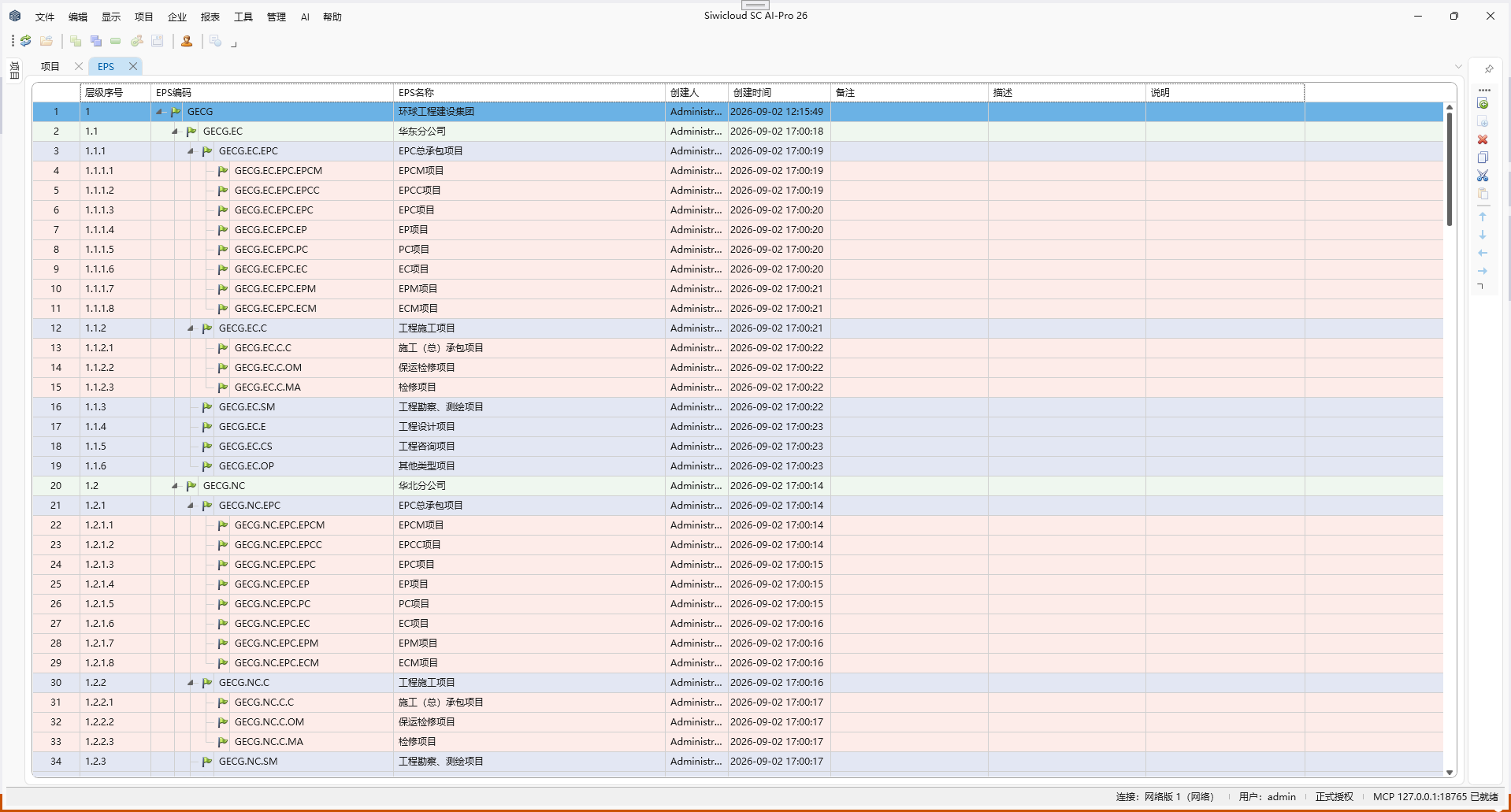
Build a unified engineering schedule management system on the enterprise project structure. The enterprise centrally maintains resource libraries, work calendars, roles, units of measure, and cost accounts; each project independently develops, calculates, and manages schedules from shared master data.
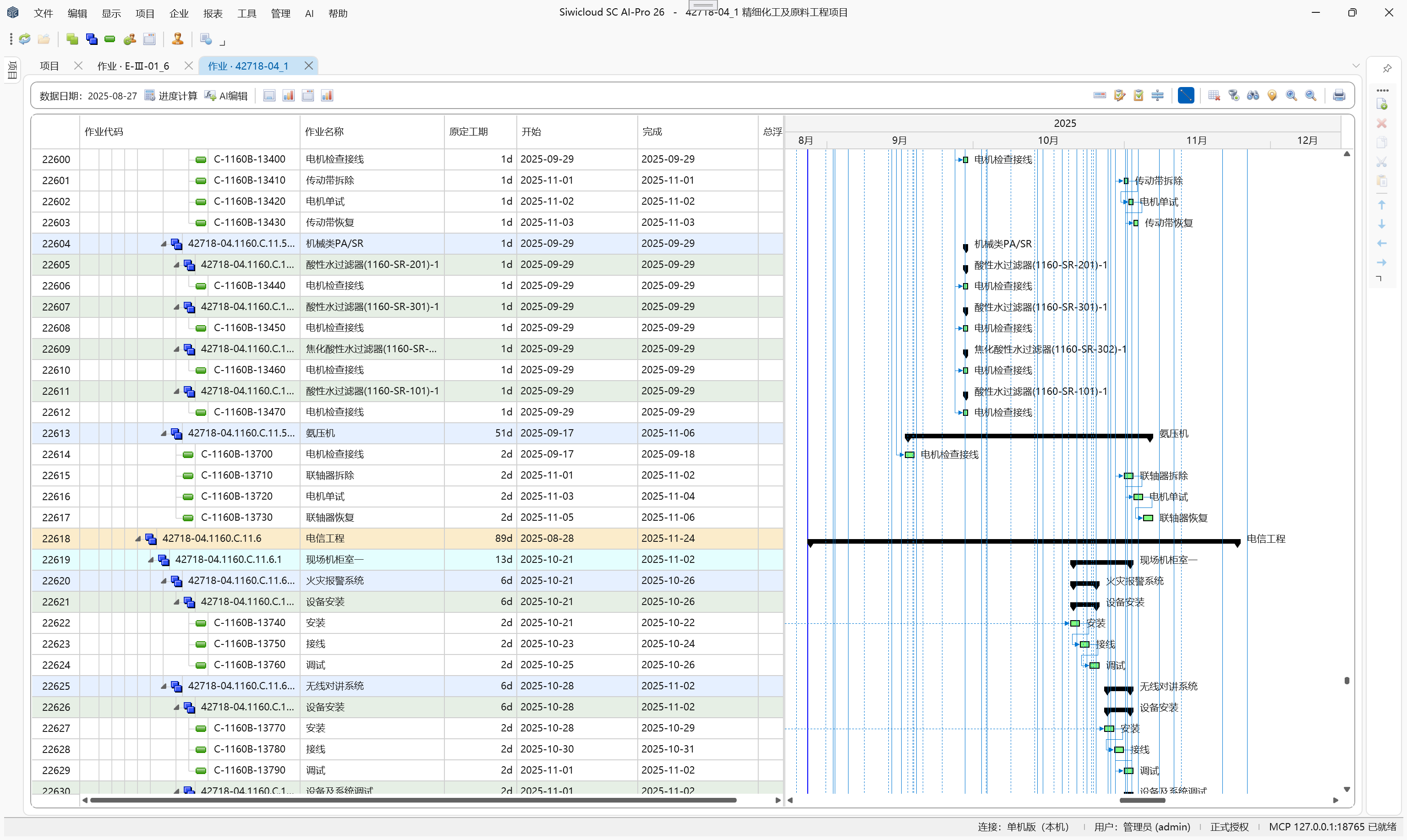
Using CPM, network schedule all activities; auto-update early/late start and finish and total float; identify the critical path and analyze multiple longest paths.
Gantt charts, logic ties, baseline comparisons, and calculation results stay linked so complex engineering schedules remain traceable and analyzable.
One enterprise-level planning system to manage schedule and resources across multiple projects.
02 · RESOURCE LOADING & ANALYTICS
Every resource allocation has timing, quantity, and justification.
Resources are not just assignment fields—they are computable data across the project lifecycle.
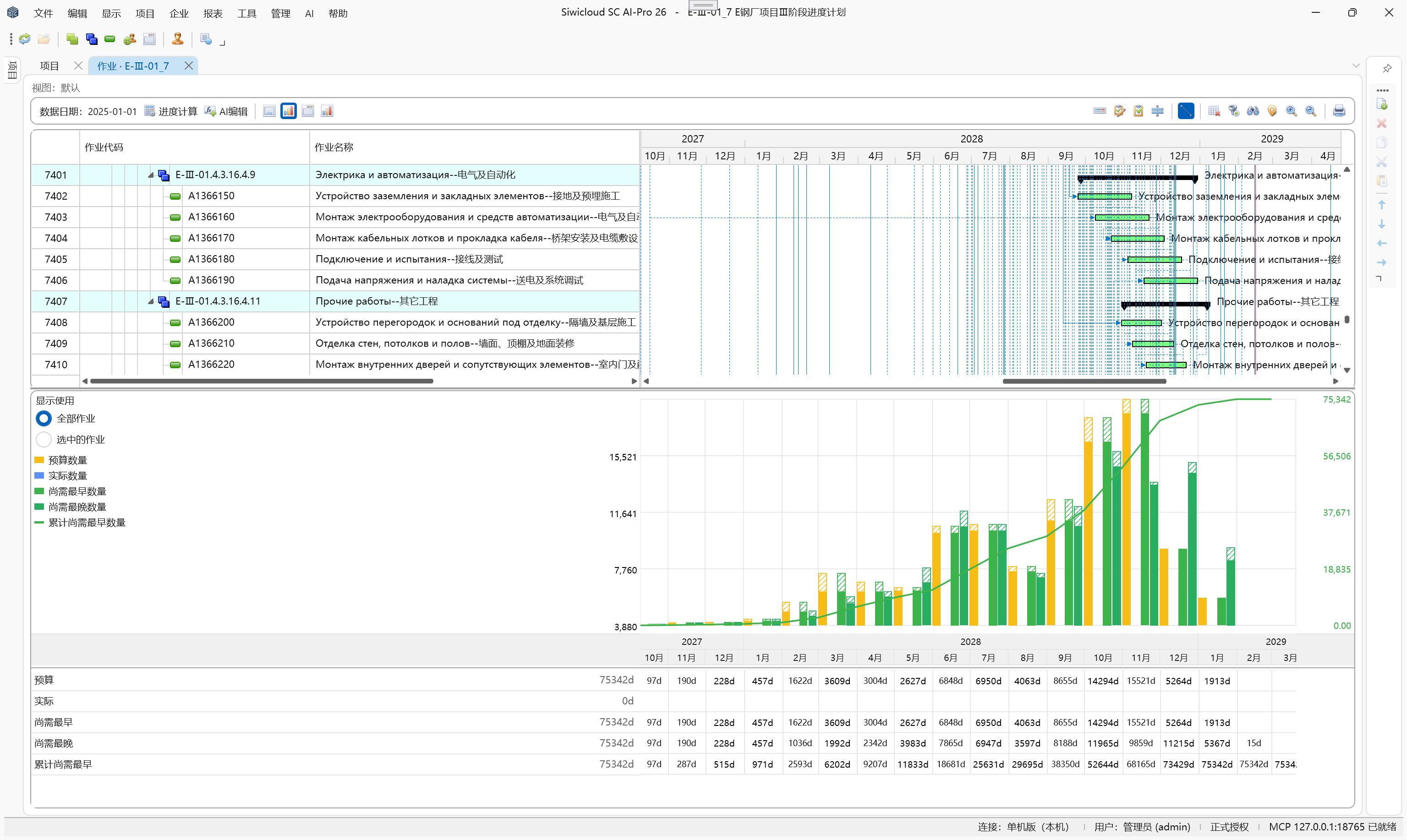
Assignments resolve to daily usage, tied to duration, resource calendars, and the schedule timeline. Analyze resource deployment over time by activity, assignment, or WBS.
Manage quantity and cost separately—budget, actual, remaining early, remaining late, and more. Planners see how much, when, where, and whether overload is coming.
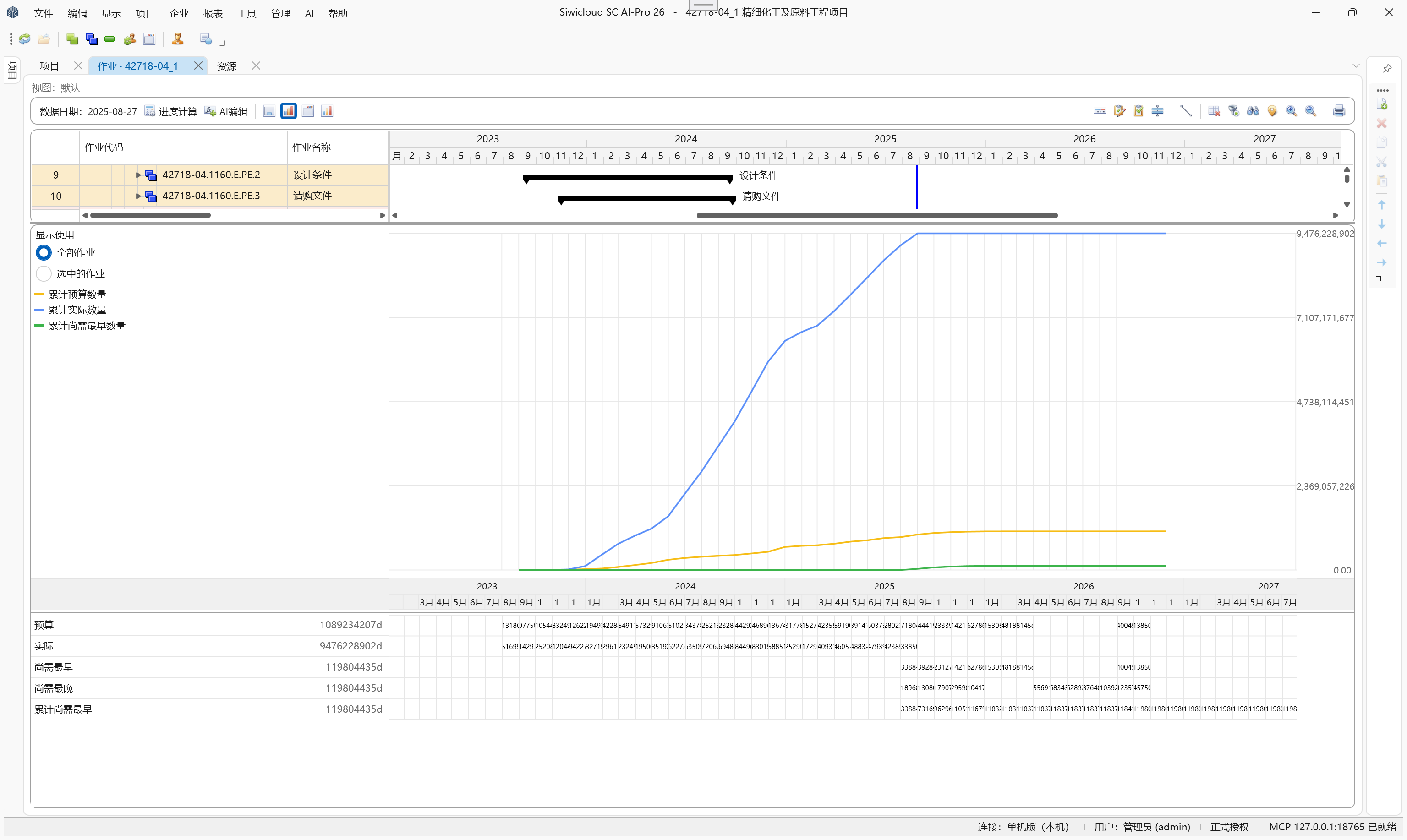
View budget, actuals, and remaining early/late effort for activities over time. Supports quantity and cost dimensions with resource-type overlays.
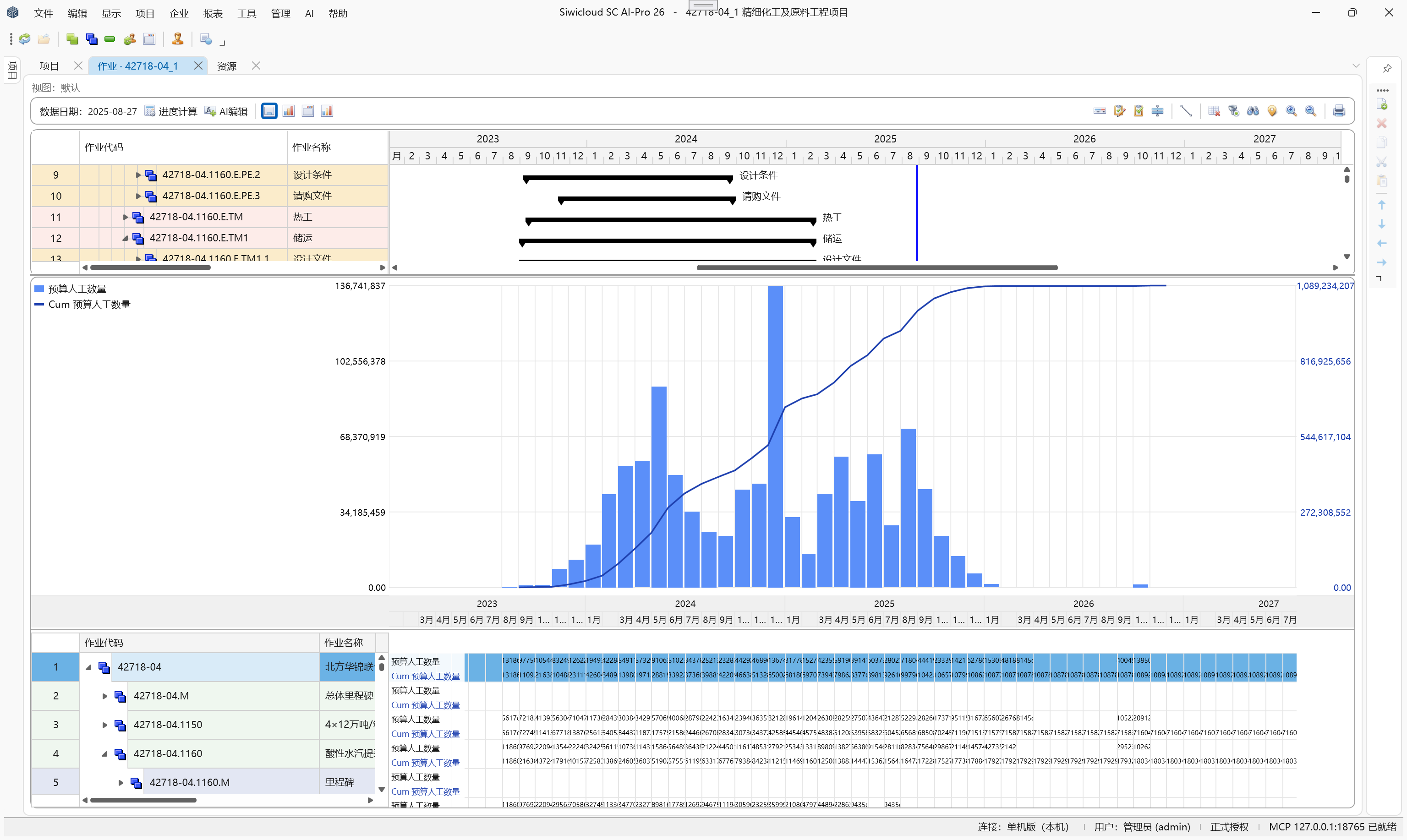
Analyze activity effort alongside the Gantt—period usage as bars, cumulative effort as curves.
Analyze quantity and cost distribution across activities centered on a single resource.
Show actual usage, remaining usage within limits, and over-limit remaining usage; overlay resource limit lines to flag overload periods.
Resource overload is not mere total comparison. SC AI_PRO calculates load and limits per resource independently; surplus on one does not offset overallocation on another. Supports activity leveling priority, float thresholds, overallocation tolerance, and leveling within float—giving planners controlled leveling levers.
Each resource is calculated independently—see exactly where overload occurs.
03 · WEIGHTING & PROGRESS MEASUREMENT
Give engineering progress a single, consistent measure.
Large engineering projects span many disciplines and work types. Activity counts or duration ratios alone cannot reflect true overall progress.
SC AI_PRO offers flexible engineering weights—multi-level structures aligning WBS, activities, and work into quantified progress weights.
Decompose and roll up weights from activities to WBS and from disciplines to projects for comparable progress across phases, trades, and projects.
Turn diverse work into unified quantitative measures—avoid crude activity-count or duration-based progress so overall status is objective, transparent, and comparable.
Every engineering activity has clear, quantifiable weight.
Overall project weight: 100%
Civil engineering
35%
Structural steel works
40%
Equipment installation
25%
WBS / activity weights
Progressive breakdown · Activity quantification · Weight rollup
Overall project completion rate
42.8%
Sample data illustrating weight roll-up logic only
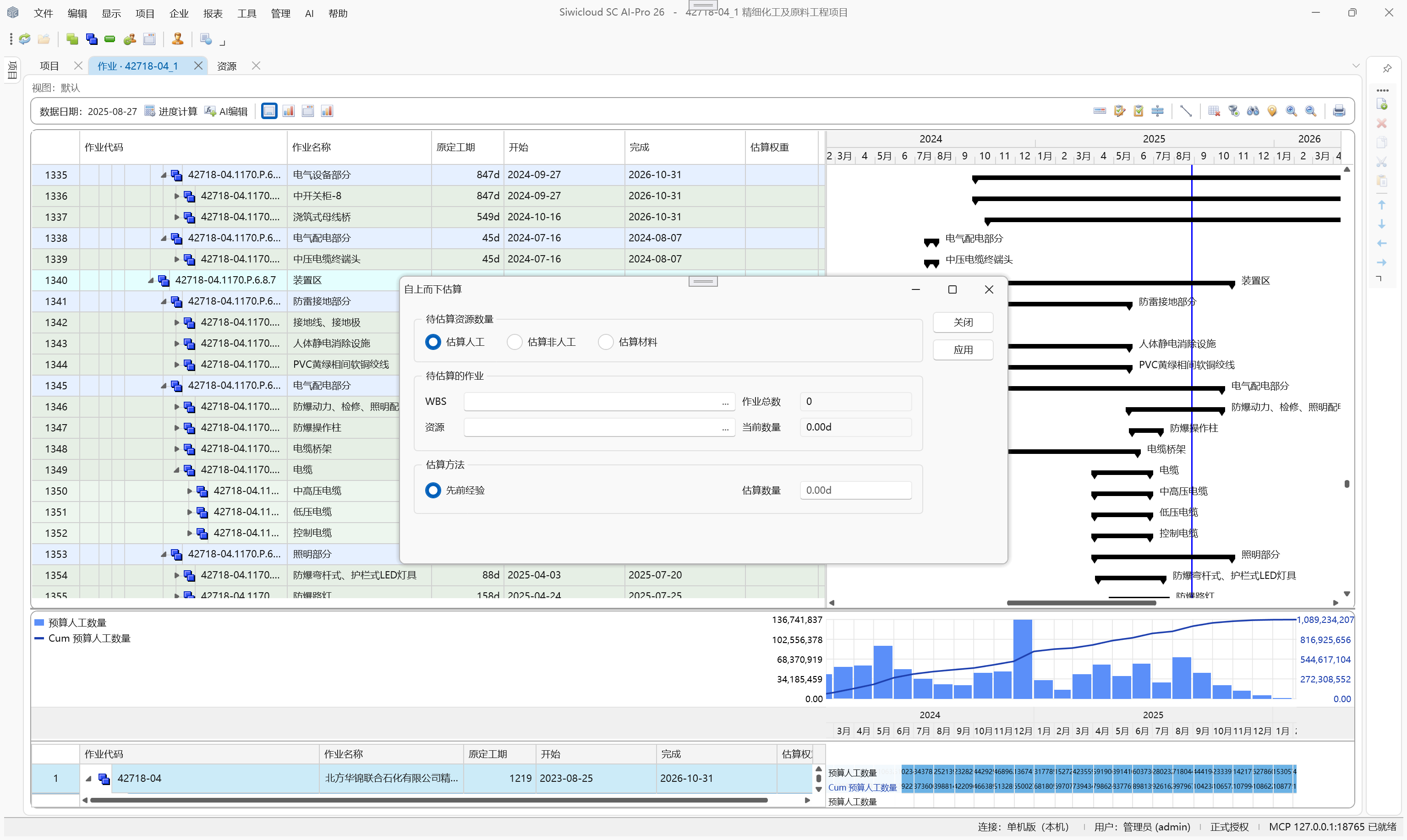
Engineering weight framework
Establish unified engineering workload measurement standards
Planned vs. actual completion
Baseline plan, actual progress, and work completion
Earned Value (EV)
Convert actual completed work into value
EVM performance analysis
PV · EV · AC · SPI · CPI
Execution forecasting and decision-making
Schedule variance · Cost variance · Forecast at completion
Engineering weight measures physical work; earned value is based on baseline budget value and percent complete. Engineering weight is not the same as cost weight.
04 · EARNED VALUE MANAGEMENT
Measure project performance with data so schedule and cost variances are clear at a glance.
True schedule management means knowing not only planned completion, but actual completion and the cost invested in that work.
SC AI_PRO unifies planned value, earned value, and actual cost in one performance framework, comparing baseline to execution to track schedule and cost performance.
Calculate earned value from engineering weight and actual progress; combine planned value and actual cost into performance metrics to flag schedule slip, cost overrun, and completion risk.
Time-series analysis and performance forecasting shift project management from hindsight to continuous monitoring and foresight.
Put planned schedule, actual progress, and cost in one performance framework—surface execution gaps, quantify performance, and feed completion and cost forecasts.
Go beyond percent complete—measure how well the project is performing.
PV
Planned value
Planned Value
EV
Earned value
Earned Value
AC
Actual cost
Actual Cost
Schedule performance
Schedule variance
SV = EV − PV
Schedule performance index
SPI = EV / PV
Cost performance
Cost variance
CV = EV − AC
Cost performance index
CPI = EV / AC
Project forecasting
The above illustrates standard EVM metrics; specific forecast formulas should follow the cost performance assumptions configured for the project.
05 · AI-POWERED SCHEDULING
Manage complex schedules in natural language while engineers retain final decision authority.
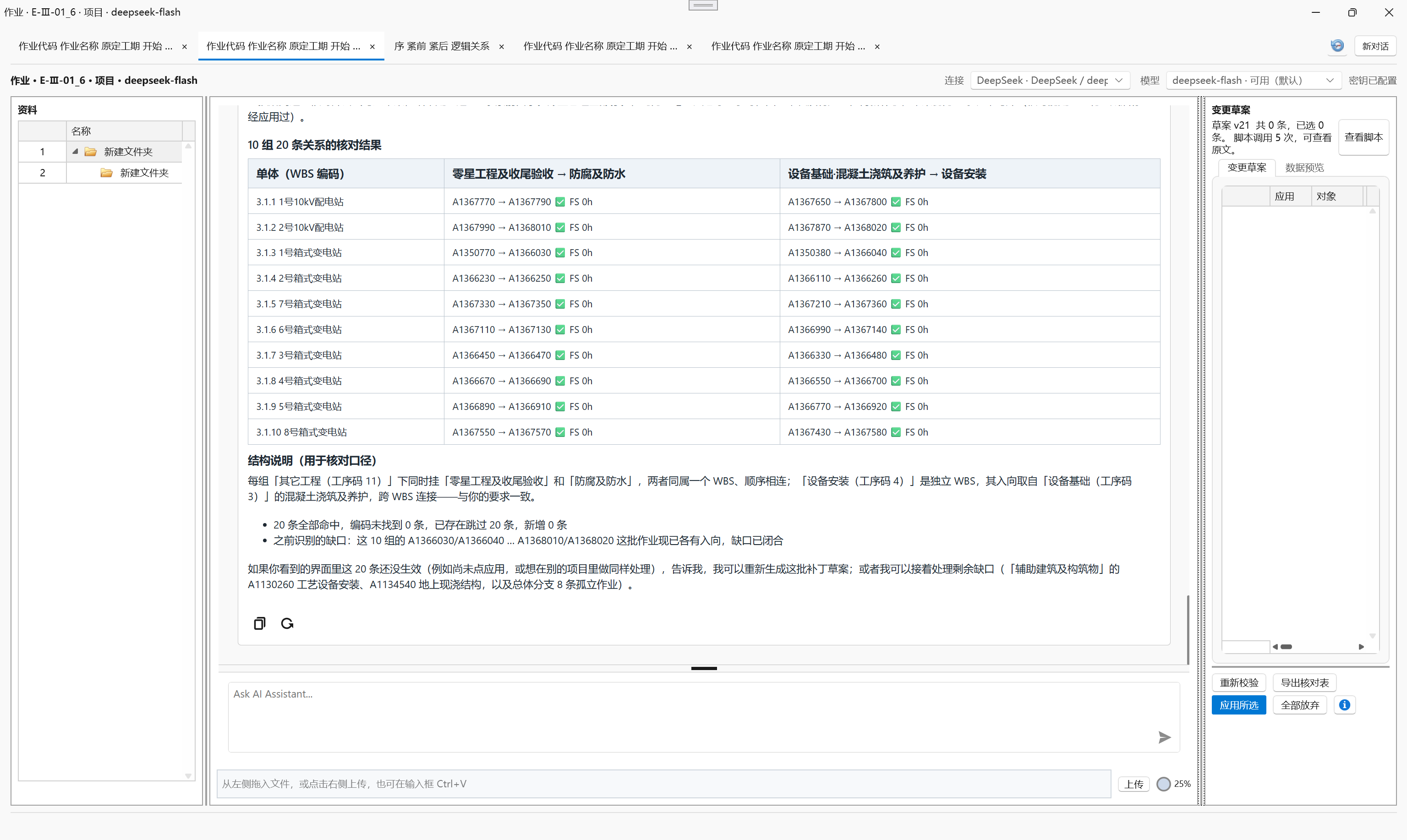
Schedule engineers no longer search and edit line by line. Through natural-language dialogue, AI interprets intent and proposes reviewable changes on existing schedule data.
Adjust activity duration, logic, or batch-edit WBS codes, resources, and schedule attributes through one consistent workflow.
For repetitive work, reuse established logic as templates across other WBS nodes—or import data directly from Excel or CSV into the schedule.
AI does not decide the schedule for engineers. All changes first appear as previewable proposals. When scope is unclear, constraints conflict, or data is missing, AI asks and waits for confirmation. Changes commit only after engineer review and apply.
Early/late dates, float, and critical path are still recalculated by the built-in CPM engine.
AI interprets and executes; engineers review and decide.
06 · OPEN MCP INTEGRATION
Let external AI agents work directly against real engineering schedule data.
SC AI_PRO includes built-in AI and exposes standard MCP APIs to external agents.
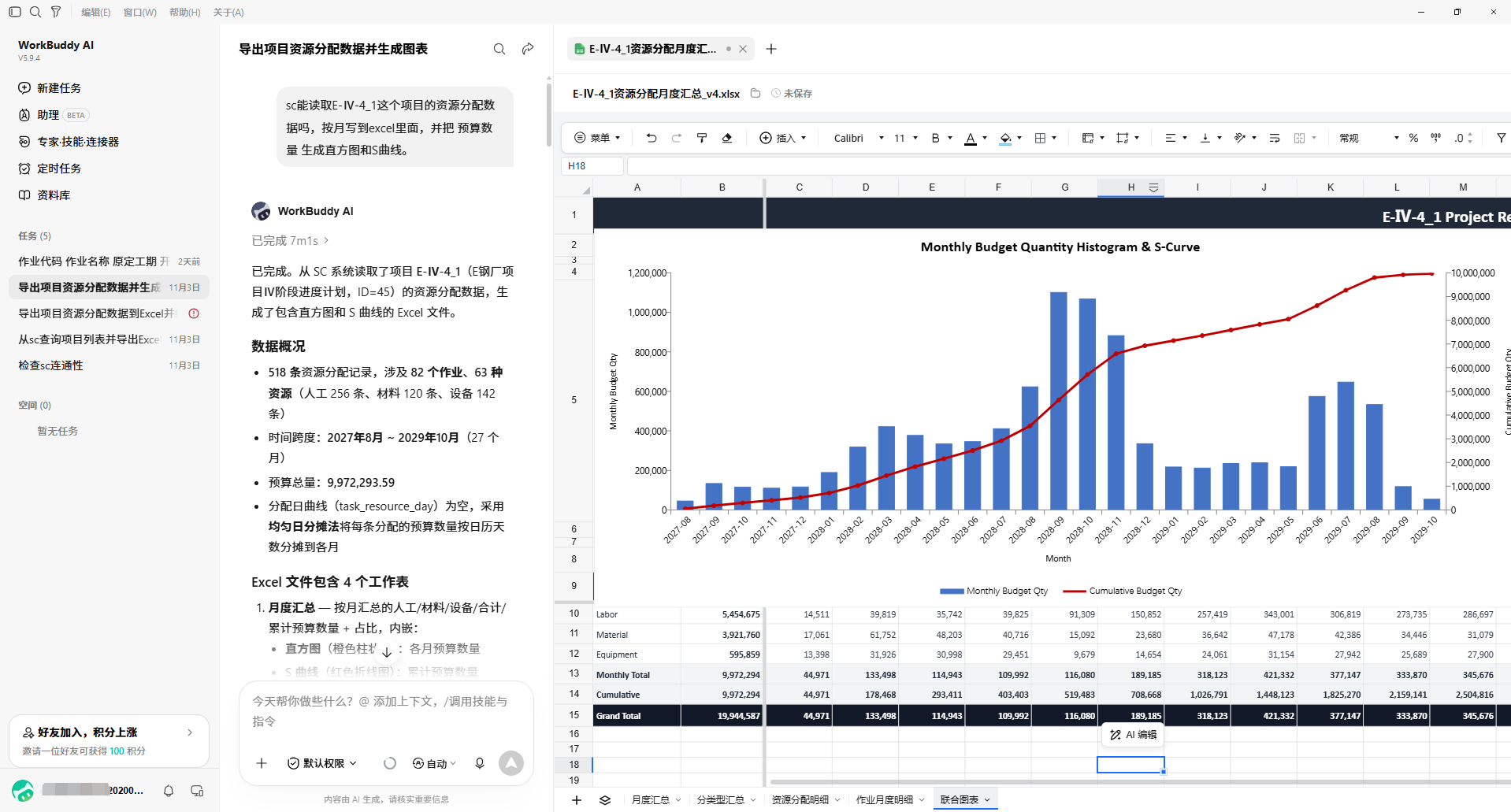
After login, the software exposes MCP services locally. MCP-enabled agents such as Cursor can, within the current user’s permissions, directly read enterprise project structure, projects, WBS, activities, logic, resource assignments, calendars, and the enterprise resource library.
Read baseline schedule data and pull daily, weekly, and monthly workloads for activities, resource assignments, WBS, and WBS–resource cross-dimensions.
External agents query, Q&A, compare, analyze, and export on live data—no Excel export step before AI.
Open read access, controlled schedule changes. External agents analyze and advise; schedule changes are reviewed and approved by planners in the system.
No need to export schedule files—agents read live engineering data directly.
07 · PRIMAVERA P6 COMPATIBILITY
Connect to a mature engineering planning software ecosystem.
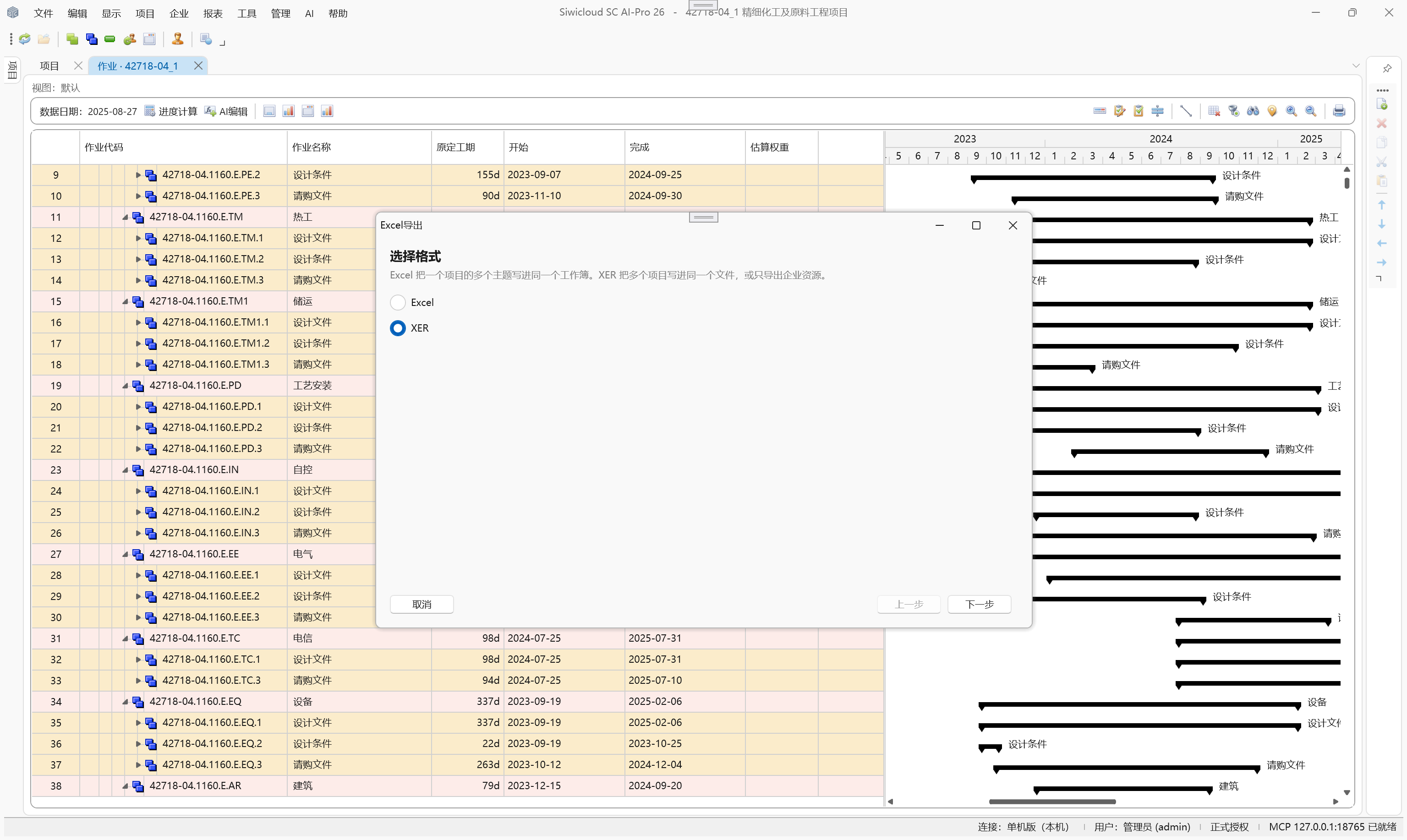
Import and export project and enterprise resource data in Primavera P6 XER format to exchange data between your Primavera P6 planning environment and SC AI_PRO.
Activity types, constraints, duration types, codes, UDFs, and scheduling options exchange with files to lower migration and collaboration cost.
Compatible with Primavera P6 XER—connect your existing engineering planning stack.
08 · MULTILINGUAL & GLOBALIZATION
A consistent professional software experience for global engineering teams.
SC AI_PRO serves international construction with multilingual UI so engineers worldwide can plan, manage resources, and analyze schedules in familiar languages.
Multi-language support for cross-border projects, global teams, and international enterprises, reducing communication barriers.
Planners work on one platform anywhere—enterprise schedule management without language or geography barriers.
A professional platform connecting global engineering teams.
13 language and region options
13
Enterprise Project Controls Platform
Engineering Progress. Under Control.
From global language support to professional engineering calculations to AI and agent collaboration—making SC AI_PRO a professional platform for international engineering projects.
